Instead of manually replaying recordings and rebuilding each tarot reading from memory, use a tarot journaling voice memo app workflow that pairs your audio with a searchable note and a dated follow-up. This 2026 guide uses Apple Voice Memos and Apple Notes for capture, organization, and insight tracking without requiring an automated integration.
- A tarot journaling voice memo app workflow needs audio capture, searchable card names, and dated follow-ups.
- Apple Voice Memos and Apple Notes support a manual recording-to-journal workflow; this is not automatic syncing.
- Keep your original interpretation separate from later events so you can review both honestly.
- Jahben provides personal tarot guidance, not recording software or an app integration.
Why this matters
An audio recording preserves your words. A written index makes the reading easier to find. Neither replaces the other: a folder full of unnamed recordings is difficult to review, while a polished summary can leave out the uncertainty you actually expressed.
For the reflection itself, start with how to journal after a tarot reading. The workflow below handles the practical side: recording, filing, and returning to the same question without rewriting your original impression.
Track what you noticed, what you chose, and what happened separately. Tarot offers a framework for reflection; a journal does not establish that a card predicted an event.
Before you start
- Gather your tools: Use an iPhone with Apple Voice Memos and Apple Notes, your tarot deck or reading notes, and a quiet place to record. Allow microphone access when prompted. This guide uses a manual handoff between apps, not a separate automation account.
- Choose your storage boundary: Decide whether the journal belongs only on your device or in a synced account. Check the destination account before saving sensitive relationship or career details, and avoid recording other people without their permission.
- Know the attachment gotcha: An audio attachment is not a reliable written index. Type the card names, question, and topic into the note yourself; do not make the workflow depend on transcription being supported on your device.
For your 2026 setup, test the complete handoff with a harmless practice recording before recording anything personal. App interfaces change, so this guide uses the core recording and sharing controls rather than a version-specific transcription feature.
Recording setup
Prepare your journal destination
- Open Apple Notes and return to the folders view. Choose the account where you want the journal stored, then use New Folder to create a folder named Tarot Journal.
- Create a note called Tarot Entry Template. Add these headings: Question, Cards and positions, First impression, Alternative interpretation, Action, and Follow-up.
- Keep the template unchanged. For each reading, create a fresh note and copy those headings into it.
- Give each entry a distinct title. Use a format such as
2026-06-12 | Career | Boundary conversation, replacing the example with your actual date and subject.
Expected result: You have a dedicated destination and a repeatable entry format before recording begins. The title identifies the reading without exposing someone's full name.
Use broad topics such as Career, Relationships, or Personal direction consistently. Changing Career to Work to Job across entries makes later searching less useful unless you remember to search every variation.
Capture the reading
- Open Apple Voice Memos and start recording with the red record control. Say the date, your question, and the cards before explaining their meaning.
- Name each card's position and orientation if you use reversals. A card name without its position loses part of the reading's context.
- Describe your first impression, then state an alternative interpretation. Finish with an action within your control.
- Stop the recording and rename it to match the journal entry's title. Play back the beginning to confirm that your voice and card names are audible.
Expected result: You have a named recording that contains the reading's context, not just a stream of impressions.
For a manageable starting routine, aim for 60 seconds of initial reflection. That is a suggested limit, not a requirement or a claim about better results. Extend it when the reading needs more explanation.
A useful spoken prompt is: What did I ask? What did I draw? What did I notice? What else could it mean? What will I do? You do not need a polished performance; you need a record you can understand later.
Journal handoff
Attach the voice memo
- Select the recording in Apple Voice Memos. Open its more-actions menu and choose Share.
- Choose Notes from the share sheet. If it is not visible, check the additional sharing destinations rather than assuming an integration is missing.
- Select the existing journal entry as the destination where the sharing interface permits it, then choose Save. If the attachment creates a separate note, move that note into Tarot Journal and add your template headings there.
- Open the saved note in Apple Notes. Play the attachment from the note before treating the transfer as complete.
Expected result: The journal entry contains a playable recording, and you know which note holds the working record.
This is a manual share, not a live connection. Do not assume later edits to the original recording will update an attachment already saved in Apple Notes. Keep your original recording until you have checked the saved copy.
For a 2026 journal, use the same date format in both places. Matching titles make a missing attachment easier to locate without listening through unrelated recordings.
Add the searchable index
- Under Question, write the exact question you asked. Do not replace it later with a more convenient version.
- Under Cards and positions, type every card name and its role in the spread. Check spelling against your deck or notes.
- Under First impression, summarize your original interpretation. Under Alternative interpretation, record a different reading of the same symbolism.
- Under Action, name a practical next step. Under Follow-up, enter a review date and leave room for observations.
Expected result: You can find the reading by topic or card name without depending on audio transcription.
Keep the distinction between an interpretation and a fact visible. For example, uncertainty about a conversation belongs under First impression; an actual conversation belongs in a dated follow-up. Do not treat the example as a card meaning or a prediction.
Insight review
Schedule and record the follow-up
- Choose a review interval appropriate to the question. Start with 7 days between reviews for a routine reflection, or use the date of the real-world event you are considering.
- Put a reminder in the calendar or reminder system you already use. Include the entry title so you can find the correct note.
- At review, read the original question before listening to your interpretation. Write what actually happened, including anything unresolved.
- Add a dated follow-up beneath the original entry. Record your action, the observable result, and what you would interpret differently now.
Expected result: Your note shows the original reading and the later observation as separate records.
Set aside 10 minutes for a weekly review as a starting appointment. Review fewer entries if needed; do not fill gaps with reconstructed memories.
The review sequence is simple: Capture, Index, Act, Review. Keep all four stages even when you shorten the recording.
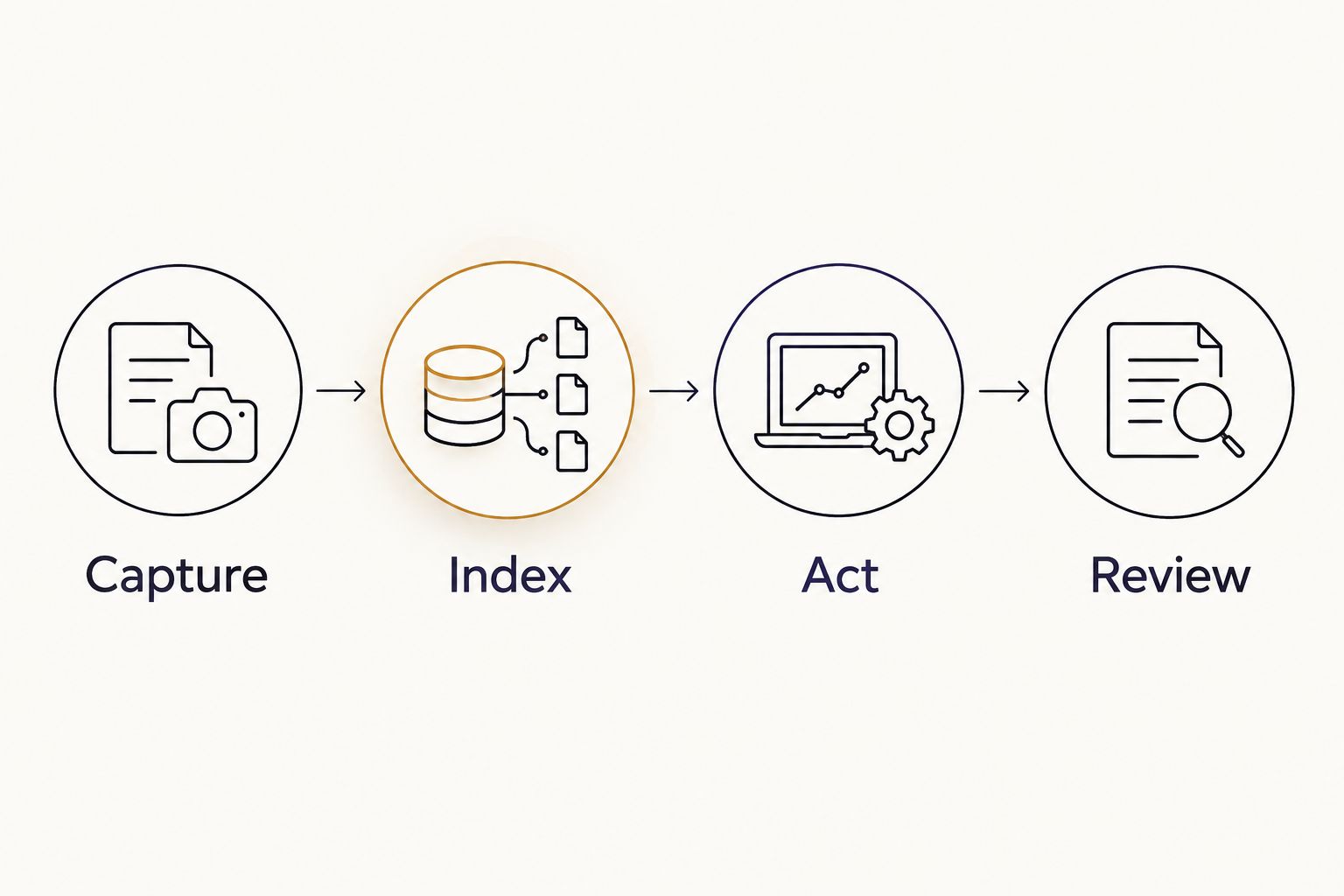
During your 2026 reviews, include entries that did not lead anywhere useful. An honest journal contains uncertainty and ordinary outcomes, not just memorable matches.
Use a compact entry template
Copy this structure into each new note:
- Question: What am I trying to understand?
- Cards and positions: What appeared, and where?
- First impression: What did I think at the time?
- Alternative interpretation: What other explanation fits?
- Action: What will I do that is within my control?
- Follow-up: What happened, and what remains unknown?
Do not turn Action into an instruction for someone else to change. You can ask for clarification, set a boundary, or gather information. You cannot use a card pull to verify another person's private thoughts.
Second variant: update the journal when circumstances change
Use an update-first workflow when the original question remains relevant but new information arrives. You do not need another card pull to record a changed situation.
- Open the original entry and read the question.
- Record a new voice memo describing only the new information and your response.
- Share it into the existing note when supported, or save it separately with the original title plus Update.
- Add a dated written summary beneath Follow-up. Preserve the first recording and interpretation.
Expected result: One question has a visible history rather than several disconnected readings that are hard to compare.
Choose the version you will maintain. Both approaches below use the same written headings.
| Approach | Best for | Main trade-off |
|---|---|---|
| Audio plus index | Preserving spoken nuance | Requires an attachment check |
| Written summary | Quick searching and review | Leaves out vocal context |
Audio plus index is best for preserving your original wording. Written summaries are best for readers who want a compact record and do not need to replay their voice. Neither approach makes tarot an objective forecasting method.
Troubleshooting
The attachment is missing or will not play
Return to Apple Voice Memos and confirm that the original plays. Share it again, check the destination note, and test playback there before deleting anything. A matching title alone does not confirm a successful transfer.
Search cannot find a card
Type the card's full name into Cards and positions. Do not rely on searching speech inside the attachment. Use the same spelling across entries and add the deck's alternate card name when relevant.
The recording has no usable sound
Check microphone permission and make a short test recording. Move away from background noise and confirm playback before restarting the reading. Do not reconstruct missing audio as though it were the original record.
Updates keep creating separate notes
Keep one entry as the main record. Copy the dated written update into it and identify any separate recording by its exact title. Manual consolidation is clearer than maintaining competing versions of the same question.
Review turns into repeated reassurance seeking
Pause new pulls about the same unchanged question. Return to the recorded action and assess whether you completed it. If journaling increases distress or interferes with daily life, step back and seek appropriate support rather than treating more readings as the fix.
Customize your workflow
Start with one recurring topic rather than a complicated tracking system. After the basic handoff works, add fields only when they answer a question you actually review, such as which actions you completed or which interpretations stayed unclear.
For your 2026 journal, keep personal guidance separate from software setup. Jahben tarot readings are best for people seeking personal spiritual guidance, not a voice memo app. A personal reading offers another interpretation; it does not remove uncertainty or replace professional medical, legal, or financial advice.
If you bring a journal question to Jahben, share a concise written summary rather than assuming audio-file submissions are accepted. Include the question, cards, and the point you want clarified. Keep unrelated private details out.
FAQ
What's the best tarot journaling voice memo app setup for this workflow?
Apple Voice Memos with Apple Notes is the setup used in this guide for recording audio and keeping a searchable written index. It requires a manual share and a playback check, not an automatic tarot integration.
Can I track tarot insights without automatic transcription?
Yes. Type your question, card names, positions, and a short interpretation into the journal note, then keep the audio as a separate reference inside the entry.
Should I record before or after looking up card meanings?
Record your first impression before consulting an interpretation guide if you want to preserve that distinction. Add researched meanings afterward and label them separately from your original response.
How long should a tarot voice memo be?
Start with a suggested 60-second reflection covering the question, cards, first impression, and action. Record longer when necessary; the goal is a usable record, not a fixed duration.
Do I need to draw more cards at every follow-up?
No. A follow-up can record new information, your action, and the outcome without another card pull. Keep any new reading separate from the original interpretation.
Does a tarot journal prove that a reading was accurate?
No. A dated journal preserves what you recorded and helps you compare it with later events, but it does not establish predictive validity or rule out selective interpretation.
Does Jahben provide a voice memo journaling app?
Jahben provides personal psychic readings and spiritual advisory services, not a voice memo journaling app. This guide describes a workflow using separate recording and note-taking tools.
One last thing
Record what would change your mind. Before closing an entry, add the observation that would make you reconsider your interpretation. That small addition gives your future review something firmer than a feeling of recognition.
Keep it specific to the question. The purpose of tracking is not to make every card fit; it is to preserve enough context to reflect honestly.
Related guides
Ready for your own reading?
Astrology, numerology, and tarot brought together into one clear, written answer about your love, career, or timing.
Book a Personal Reading Get Your Free Report