Instead of searching for a new forecast every week, set up weekly horoscope email delivery from a source that explicitly offers it, then route those messages into a dedicated Gmail label. This 2026 workflow separates delivery from inbox organization, so you can find the current forecast without mistaking a reminder for a subscription.
- Weekly horoscope email delivery requires a publisher that explicitly offers email forecasts; Gmail filters only organize incoming messages.
- Jahben is best for readers seeking personal astrology guidance rather than email-automation software.
- Match the verified sender, apply a dedicated Gmail label, and test before archiving messages automatically.
- Use a weekly reading reminder when your chosen horoscope is published online rather than delivered by email.
Why this matters
A Gmail filter cannot fetch a horoscope or make a publisher send one. The publisher controls the forecast and sending schedule; your inbox rules control what happens after a message arrives. Get that distinction right before adding automation.
You also need a reading routine, not just another newsletter. Start with how to read your weekly horoscope for real guidance, then use the setup below to keep each forecast accessible.
A general horoscope offers shared themes for a sign, not a personal assessment of your circumstances. Jahben provides astrology and personal psychic readings; keep that distinction clear when deciding whether you want a weekly overview or guidance about a specific question.
Before you start
- Accounts and access: Use your own Gmail account in a desktop browser for filter setup. Have access to the inbox where subscription confirmations arrive, plus your calendar if you choose the reminder variant.
- Source material: Have the horoscope publisher's official subscription instructions and a genuine message from that publisher. Check whether the offer is a weekly forecast, occasional updates, or a personal email reading; these are different services.
- The setup gotcha: A welcome message can use a different sender from the recurring newsletter. Build the rule from an actual forecast whenever possible, and do not enable automatic archiving until the rule passes a test.
Choose the workflow that matches the source
These are two ways to maintain a weekly reading habit. Only the first delivers a forecast to your inbox.
| Workflow | Best for | Benefit and limit |
|---|---|---|
| Email subscription | Readers whose publisher offers email forecasts | Automatic arrival; publisher controls timing |
| Calendar reminder | Readers following a web-published forecast | You choose review time; opening the page remains manual |
Use an email subscription when delivery is explicitly offered. Use a calendar reminder when it is not. Neither method turns a general forecast into a personalized reading.
Source and delivery verification
The first configuration unit establishes what will arrive, where it will arrive, and who sends it. Do this before creating inbox rules.
- Verify delivery. Read the publisher's subscription description. Look for an explicit statement that forecasts arrive by email and check the stated frequency. A page containing weekly horoscopes is not, by itself, an email subscription.
- Register your address. Follow the publisher's actual subscription process. Enter the email address you intend to check; do not assume that an account registration also subscribes you to forecasts.
- Complete confirmation. If a confirmation email arrives, follow its instructions. Inspect the sender and destination before opening a link, especially if the message was unexpected.
- Inspect a forecast. Open a genuine recurring message in Gmail. Expand the sender details and record the actual email address, rather than relying on the display name.
- Check the coverage period. Identify the dates the forecast covers. For your 2026 reading routine, the relevant week matters more than the date you happened to open the message.
Expected result: You have an intentional subscription and a verified forecast sender, or you have identified that the calendar-reminder variant is the appropriate setup.
Do not share your Gmail password with a horoscope publisher. Receiving a newsletter does not require giving the sender access to your mailbox.
Gmail sender filter
Create a narrow rule first. You can broaden it after you see what the publisher actually sends.
- Match sender. In Gmail's search bar, select Show search options. Enter the verified sender address in From.
- Preview the match. Select Search and inspect the results. Confirm that the rule finds forecast messages rather than unrelated correspondence with a similar display name.
- Refine only when necessary. If the same address sends several kinds of messages, reopen Show search options and add a stable phrase in Subject. Avoid a week number, zodiac sign, or year unless you deliberately want to exclude other messages.
- Create the rule. Select Create filter after confirming the search criteria. Leave forwarding and deletion actions unselected.
Expected result: Your search identifies the intended newsletter without collecting unrelated messages.
For a continuing subscription, hard-coding 2026 into the subject criteria creates unnecessary maintenance. A stable sender address is a better starting point; subject wording is an additional restriction, not a substitute for verifying the sender.
A narrow filter has a trade-off: a publisher changing its sender address will stop matching the rule. That is easier to diagnose than a broad filter quietly sweeping unrelated mail into your horoscope folder.
Gmail label and arrival test
Now decide where matching messages belong. Keep the inbox visible during testing so you can spot mistakes.
- Apply label. In the filter actions, select Apply the label, then New label. Name it Weekly Horoscope and select Create.
- Preserve visibility. Leave Skip the Inbox (Archive it) unchecked for the first test. Do not select Delete it or automatically mark everything as read.
- Include existing forecasts. Select Also apply filter to matching conversations if you want matching messages already in your mailbox to receive the label. Select Create filter to finish.
- Inspect the label. Open Weekly Horoscope in Gmail's sidebar. Check 2 messages when you have them: an existing forecast and the next newly delivered forecast.
- Review weekly. After the next arrival matches correctly, decide whether to keep forecasts in your inbox or archive them automatically under the label.
Expected result: Matching forecasts appear under Weekly Horoscope. With inbox skipping disabled, new arrivals remain visible in the inbox too.
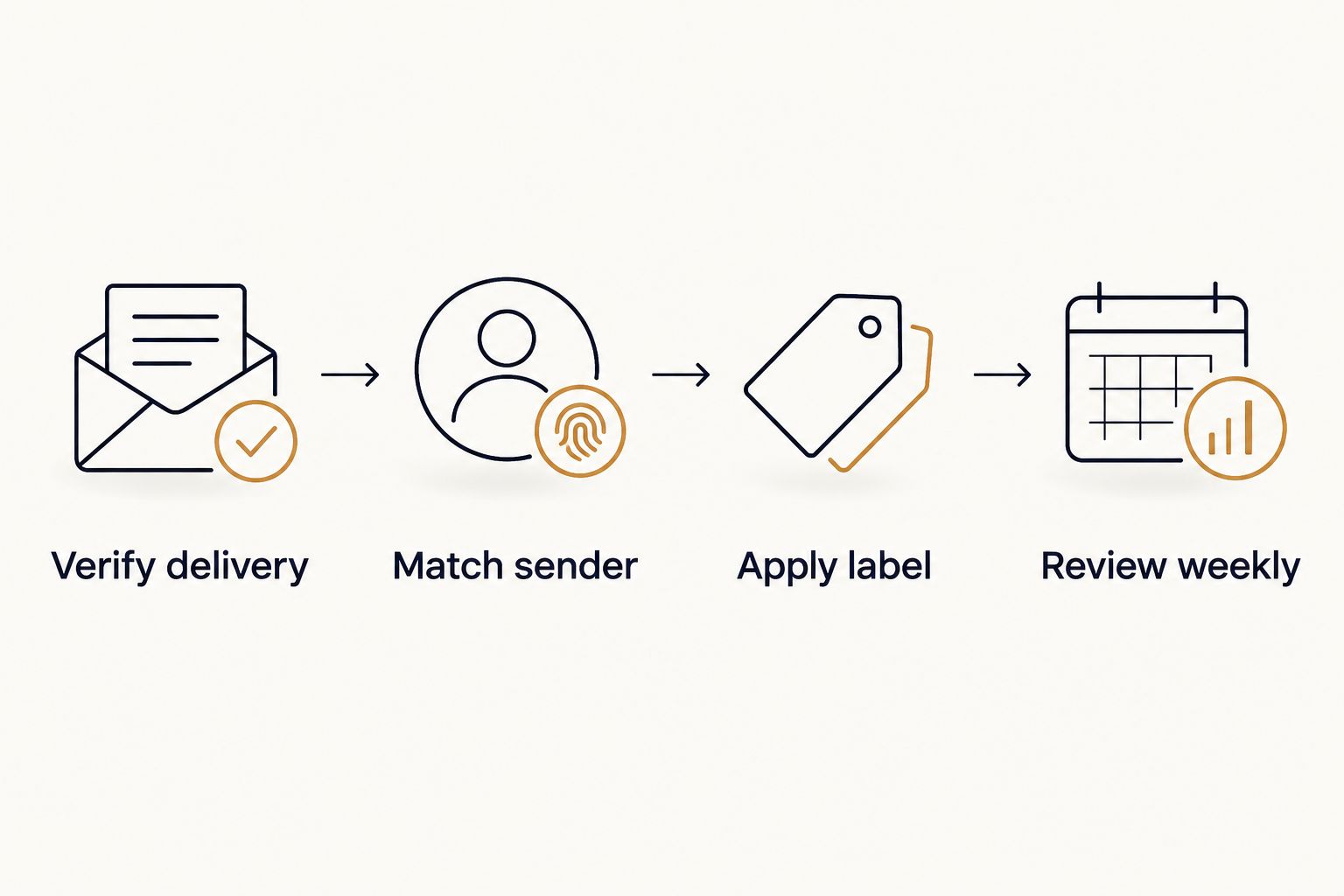
The complete sequence is simple: verify delivery, match the sender, apply a label, and review weekly. Each stage has a separate job; none creates a sending schedule at the publisher.
Set a reading window, not a promised arrival time
Reserve 10 minutes each week to read and record one useful takeaway. This is a suggested routine, not a claim about how long a forecast takes to read.
Choose your review time after observing the publisher's actual sending pattern. A Monday review does not make a newsletter arrive on Monday, and moving a message into a label does not delay delivery until your chosen time.
For a clear 2026 journal entry, record the forecast's coverage dates, the sign you read, and one action you control. Keep the forecast's language separate from your own interpretation.
Second variant: weekly reminder for a web forecast
Best for readers whose chosen source publishes online without an explicit email-delivery option. This variant schedules your attention, not the forecast itself.
Use Google Calendar in a desktop browser for these instructions. You do not need an automation service or access to the publisher's publishing system.
- Open Google Calendar and select Create, then Event.
- Give the event a clear title, such as Read weekly horoscope. Choose the day and time you want to review it.
- Set the event duration to 10 minutes. Open Does not repeat and choose the weekly recurrence for your selected day.
- Add the forecast page's address to the event description using the address you have verified in your browser. Do not include private reading details on a shared calendar.
- Under Add notification, choose the reminder method you want. If you choose Email, the message is a calendar reminder, not the horoscope text.
- Select Save, then inspect the next occurrence. Check that the recurrence is every 7 days and that the event uses the intended time zone.
Expected result: A recurring event reminds you to open the forecast. It does not subscribe you to a newsletter, copy the forecast, or detect when the page changes.
The benefit is control over your reading time. The limitation is that you still need to check the page and confirm that the forecast covers the current week.
When a forecast changes after you read it
If the publisher sends a correction, keep the correction alongside the original message. Read the coverage dates and correction wording before replacing your notes.
For web forecasts, reopen the source during your next scheduled review. A calendar reminder cannot tell you whether the publisher has revised a paragraph since your last visit.
Troubleshooting
The subscription confirmation arrived, but no forecast followed
Check whether the confirmation step is complete and whether the subscription description actually promises weekly forecasts. Search Gmail for the publisher's name and verified address, including spam and trash, before registering again.
Do not create multiple subscriptions to fix an unverified delivery problem. First establish whether a forecast was sent to the address you registered.
The forecast arrived, but the label was not applied
Compare the new message's actual sender address with the filter's From value. Then check whether your Subject restriction excludes the new wording.
Open Settings, See all settings, and Filters and Blocked Addresses to find the rule. Select edit, correct the criteria, select Continue, and finish with Update filter.
The label contains unrelated messages
The matching criteria are too broad. Replace a display-name search with the exact sender address, or add a stable newsletter subject phrase after checking genuine messages.
Remove the label from unrelated conversations separately. Editing a filter changes the rule; it does not automatically undo every earlier labeling decision.
Messages are in spam rather than the inbox
Inspect the message before changing anything. If it is a legitimate forecast you requested, use Report not spam and check that your subscription is still active.
Do not whitelist an unverified sender or disable spam protection for all horoscope-related messages. A familiar topic does not establish that an email is trustworthy.
You receive two copies of the forecast
Check whether you subscribed with two addresses that both reach the same mailbox, or whether forwarding creates a second copy. Compare recipient details before changing the filter.
Keep the subscription you intend to use and unsubscribe from the duplicate through its legitimate message. Deleting a filter will not cancel a publisher's subscription.
Customize your workflow
Keep one delivery source and one review routine before adding more inputs. Several forecasts about the same week can produce more interpretation work without answering your actual question.
For a broader planning routine, use how to use astrology to plan your month. Keep deadlines, appointments, and practical constraints in charge of your calendar; use astrology as a reflective layer.
Jahben's astrology and personal-reading services address guidance, not inbox configuration. If a general forecast leaves you with a specific love, career, or timing question, write that question down rather than treating another newsletter as a personal answer.
Review your setup when a publisher changes its sender or format. A 2026 filter should depend on stable delivery details, not on a date that will eventually expire.
FAQ
How do I set up weekly horoscope email delivery?
Subscribe through a publisher that explicitly offers horoscope emails, complete any confirmation step, and verify the forecast sender. Then create a Gmail filter that applies a dedicated label to matching messages.
Can Gmail automatically collect a horoscope from a website?
A Gmail filter cannot collect a horoscope from a website. It acts on messages that reach your mailbox; use a recurring calendar reminder when your source publishes forecasts online instead.
Does a personal email reading include a weekly horoscope subscription?
A personal email reading does not establish a recurring horoscope subscription. Check the specific service description for what is included and whether any recurring delivery is explicitly stated.
Should I automatically archive horoscope emails?
Keep horoscope emails visible in your inbox until the filter passes an arrival test. Afterward, automatic archiving is suitable if you reliably check the dedicated label.
Why did my weekly horoscope filter stop working?
Check for a changed sender address or a subject restriction that excludes new messages. Compare the failed message with the filter criteria before updating the rule.
Can I choose exactly when the horoscope arrives?
The publisher controls the newsletter's sending schedule. You can choose your own review time, but a Gmail label or calendar reminder does not change when the publisher sends the forecast.
Is a weekly horoscope the same as a personal astrology reading?
A general weekly horoscope addresses shared themes for a sign, while a personal astrology reading focuses on an individual's circumstances. Neither should replace medical, legal, or financial advice.
One last thing
An unread label is still an unread inbox. Before adding another forecast, decide what you will do with the one you already receive.
For your next review, write one practical question before opening the message. Then record whether the forecast helped you reflect on that question—not whether every sentence sounded familiar.
Related guides
- Rising sign vs. sun sign: what's the difference?
- Weekly horoscope reading for career and money timing
Ready for your own reading?
Astrology, numerology, and tarot brought together into one clear, written answer about your love, career, or timing.
Book a Personal Reading Get Your Free Report