Instead of finding and reading your affirmation manually each morning, create a Google Home daily affirmation routine that speaks your chosen words when you say a phrase or at a scheduled time. Start with a personal routine, add a spoken-message action, select your speaker, and test the complete ritual before relying on it.
- A Google Home daily affirmation routine works best with your own short statement and a tested speaker output.
- Use a voice starter for flexible mornings; use a scheduled starter for a fixed daily ritual.
- Jahben offers personal spiritual guidance, not a Google Home integration or an automated affirmation feed.
- Keep private reading details out of spoken messages that other household members can hear.
Why this matters
A spoken affirmation gives your ritual a clear starting point. You still choose the words and take the next step; the speaker handles the reminder.
Use Google Home for repetition, not prediction. An affirmation is a statement of intention, not proof that a relationship, career move, or financial outcome will unfold as you want.
Jahben is best for people seeking personal spiritual guidance rather than smart-home setup. If your affirmation comes from a reading, the distinction between reflection and interpretation matters; the guide to layered readings combining astrology, tarot, and numerology explains that broader approach.
For your 2026 setup, keep the technology separate from the spiritual content. Google Home runs the routine; you supply the statement. This workflow does not connect to a reading account, retrieve private advice, or create a new message automatically each day.
Before you start
- Accounts and access: Have the Google Home app, a signed-in Google account, and a configured Google Home or Nest speaker connected to the internet. Confirm that you can already ask the speaker a basic question and hear its response.
- Your message: Write one short affirmation in a note before opening the routine editor. Use a statement about your choices, such as: I can pause, ask a clear question, and choose my next step.
- The gotcha: A routine's starter and its audio destination are separate settings. A saved routine is not proof that your chosen speaker will speak; confirm the output device and test it. Personal and household routines also offer different actions, so begin with a personal routine.
Google Home screens differ across accounts and app releases in 2026. The steps below use the Automations editor and its routine labels; follow the matching labels on your screen rather than forcing an action your editor does not offer.
Your affirmation and trigger
Before configuring Google Home, decide whether your ritual follows the clock or your actual availability. A voice starter is the better first setup because you can test it immediately and use it when you are ready. Its limitation is that you must remember to speak the phrase.
| Starter | Best for | Main limitation |
|---|---|---|
| Voice phrase | Changing morning schedules | Requires you to ask |
| Scheduled time | A consistent daily ritual | Can speak when you are absent |
These are two ways to start the same practice, not two different spiritual methods. Neither makes the affirmation more meaningful by itself.
Choose words you can act on
Keep the message within your control. Instead of promising that someone will contact you, choose language about how you will communicate or hold a boundary.
Useful drafts include:
- Career: I can name my next task and give it my attention.
- Relationships: I can ask directly instead of filling silence with assumptions.
- Life direction: I do not need every answer before taking a thoughtful step.
These are sample scripts, not quotations from a reader or claims about future events. Read your statement aloud once. If it feels false, simplify it until you can say it without arguing with yourself.
As a starting exercise, reserve 60 seconds for the whole ritual: hear the message, pause, and identify an action. That is a suggested format, not a measured effectiveness claim.
Personal routine configuration
Create your routine
- Open the Google Home app and check that you are using the account associated with your speaker.
- Open Automations.
- Tap Add and select Personal when the editor asks which type of routine to create.
- Give the routine a recognizable name, such as Morning affirmation, using the routine-name field.
- Select Add starter.
- Choose When I say to Google Assistant and enter a distinctive phrase, such as Begin my grounding ritual.
- Save the starter using the confirmation control shown in the editor.
Avoid phrases that sound like ordinary requests for music, news, or an alarm. A distinctive phrase makes it easier to tell whether Google Home is starting your routine or answering a general question.
Expected result: The routine editor shows your voice phrase as a starter. You have defined when the routine begins, but it does not yet contain the words to speak.
If your 2026 app presents a different automation builder, locate its routine-creation controls before continuing. Do not substitute an unrelated household announcement simply because it is easier to find; an announcement can have a different audience from your intended personal ritual.
Spoken-message configuration
Add the affirmation
- In the routine editor, select Add action.
- Open Communicate and announce.
- Select Say something when that action is offered for your personal routine.
- Enter your affirmation as plain text. Use punctuation to separate thoughts rather than typing one long sentence.
- Confirm the action and return to the routine editor.
- Check the action summary to make sure it contains your intended wording.
Expected result: Your routine contains an action that speaks the text you entered, rather than a request to search for an affirmation.
The distinction matters. Asking the assistant for an affirmation hands over the wording; entering your own statement keeps your ritual consistent. If Say something is not offered, do not assume another action has the same behavior. Check the actions supported by your routine type before building the rest.
Do not paste an entire Jahben reading into the message. Personal guidance can include details you would not want spoken in a shared room, and a long passage turns a simple cue into a listening task.
Keep the message grounded
A useful script pairs intention with behavior: I can slow down before answering. Today, I will ask for clarification when something is unclear.
The first sentence sets the tone. The second identifies something you can actually do. Neither guarantees that other people will respond as you hope.
Speaker output and test configuration
Choose where the affirmation plays
- Find Device for audio in the personal routine editor when that setting is available.
- Select the speaker where you intend to practice.
- Save the routine with Save.
- Stand near the selected speaker and say your starter phrase after the usual wake phrase.
- Listen for the complete statement, including its final sentence.
- Adjust the speaker volume, then repeat the test.
Expected result: The intended speaker reads the intended text at a comfortable volume when you use your phrase.
Treat this as an end-to-end test, not just a check that the routine saved. The starter, spoken action, and audio destination each need to work.
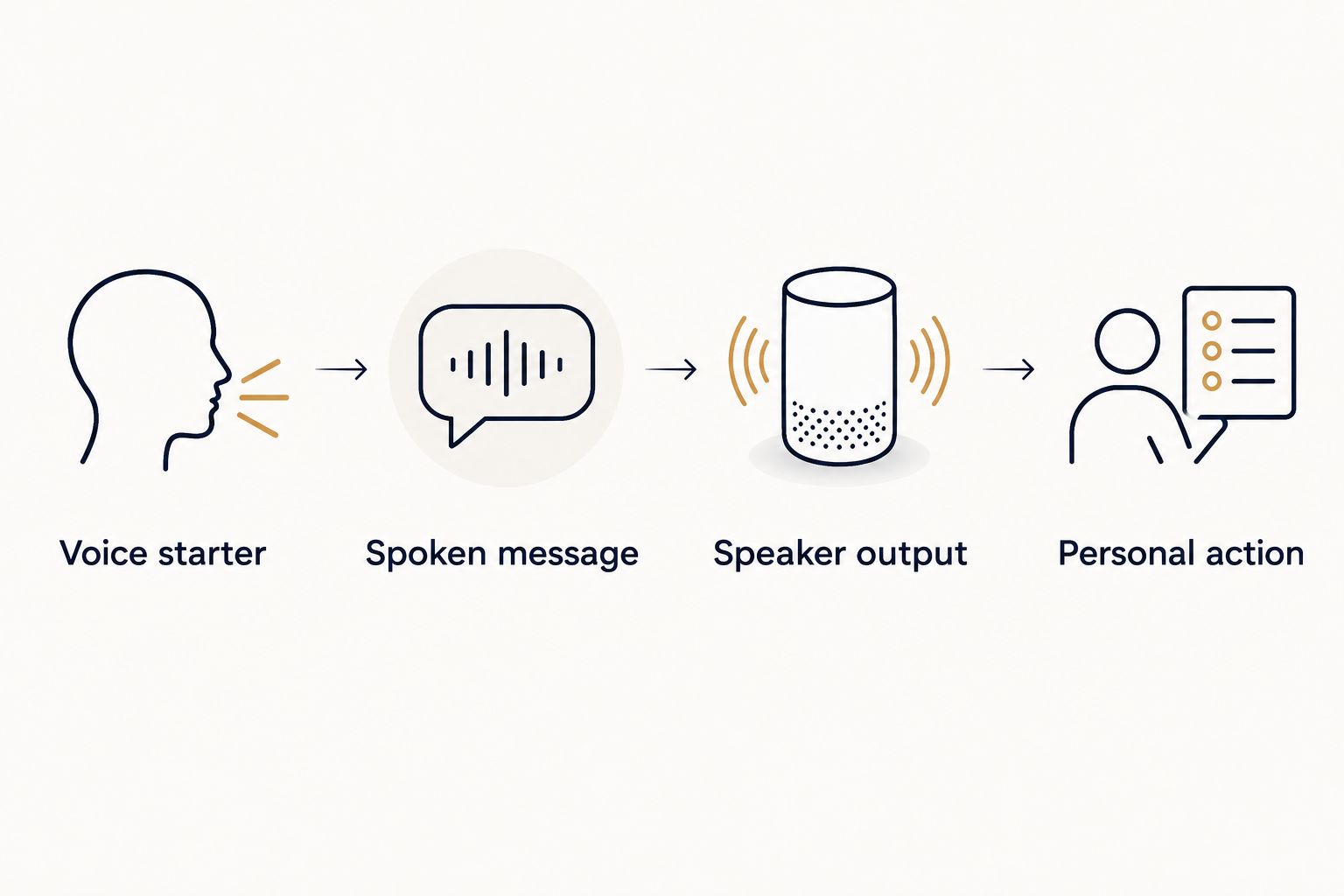
The workflow is a simple sequence: Voice starter, Spoken message, Speaker output, Personal action. Only the first three belong to the device setup. The last belongs to you.
Test the ritual, not just the sound
After the speaker finishes, pause instead of immediately asking for another command. Name the action your affirmation points toward, then do it or write it down.
For example, a career affirmation can lead to opening the task you have been avoiding. A relationship affirmation can lead to drafting a direct question without sending it impulsively.
Try the same wording for 7 days before deciding whether to rewrite it. This is a suggested review interval, not a promise about habit formation. Record whether you used the routine and whether the wording still fits.
Run your affirmation at a scheduled time
A scheduled starter is useful when your morning has a predictable opening. Its drawback is simple: a speaker follows the schedule even when your plans change.
- Open the tested personal routine in Automations.
- Select Add starter.
- Choose At a specific time when that starter is offered.
- Set your preferred time and select the days you want it to run.
- Confirm the starter, check the audio destination again, and select Save.
- Test with a temporary time 10 minutes ahead while you are nearby, then restore your intended schedule.
Expected result: The selected speaker reads the affirmation at the test time without requiring your voice phrase.
Keep the voice starter if you also want an on-demand option. Avoid creating a second routine with the same scheduled time and spoken message; maintaining one routine makes later edits clearer.
For a 2026 schedule, check the selected days rather than assuming daily repetition is enabled. After travel or a time-zone change, inspect the schedule again and run another nearby test.
What about a different affirmation every day?
The spoken-message action reads the text you enter. This guide does not create a rotating library or pull a fresh affirmation from an external source.
Edit the existing message when your intention changes. That approach is direct and easy to inspect, although it requires a manual update. For a more elaborate rotation, first confirm which actions your own account and devices support rather than assuming an older tutorial still applies.
Troubleshooting
The speaker answers instead of starting the routine
Change the starter to a more distinctive phrase and confirm it is saved under the correct account. Test with the exact phrase you entered before trying conversational variations.
A generic request such as Give me an affirmation is harder to distinguish from a normal assistant request. Use the phrase attached to your routine.
The routine starts, but you hear nothing
Check the speaker's volume and the routine's audio destination. Confirm that the spoken-message action is still present, then try the voice starter while standing beside the selected device.
For a scheduled routine, also inspect the speaker's Digital Wellbeing settings, including Downtime, if configured. Test again during an unrestricted period before changing other parts of the routine.
The spoken-message action is missing
Confirm that you are editing a personal routine rather than a household routine. Action choices differ by routine type and device support.
If the action still does not appear, check Google Home's in-app help for your current configuration. Do not enter private text into a broadcast action as an improvised replacement.
The affirmation runs twice
Inspect the routine's starters and look for another routine using the same time or phrase. Remove the redundant trigger or disable the duplicate routine, then test again.
A voice starter and a scheduled starter can coexist intentionally. The problem is overlapping executions, not simply having more than one way to begin.
The wrong people hear your message
Stop the routine and review its output device and action type. Replace sensitive wording with a neutral statement before testing in a shared space.
A personal routine is not a private listening channel. Anyone within earshot of the speaker can hear its output.
Customize your workflow
Keep the technical setup stable while changing the intention. Edit the spoken statement instead of rebuilding your starters whenever your focus shifts.
Jahben personal guidance can inform what you reflect on, but Google Home does not interpret that guidance for you. Translate a useful theme into your own words without turning it into a guaranteed outcome.
Use this short editing checklist:
- Agency: Does the statement describe something you can choose?
- Clarity: Will you understand it without extra explanation?
- Privacy: Is it appropriate for everyone who might hear it?
- Action: Can you identify a practical next step?
Review your 2026 routine when your schedule or circumstances change. Remove language that no longer fits instead of repeating it out of obligation.
FAQ
How do I set up a Google Home daily affirmation routine?
Create a personal routine in Google Home, add a voice or time starter, and add a spoken-message action where supported. Enter your affirmation, select the audio device, save, and test the complete routine.
Can Google Home say my own affirmation?
Yes, a supported Say something action lets you enter the words your routine speaks. Check that the action appears in your personal routine editor before continuing.
Can my affirmation play automatically every morning?
Yes, use a scheduled starter where supported and select the intended days. Test the schedule while you are nearby and confirm which speaker produces the audio.
Will Google Home choose a new affirmation every day?
Not with the fixed spoken-message workflow in this guide. The routine repeats the text you enter until you edit it.
Does this routine connect directly to Jahben readings?
No, this workflow does not connect to Jahben readings or retrieve their contents. You choose and enter your own statement manually.
Is a voice starter better than a scheduled affirmation?
A voice starter is best for a changing schedule; a scheduled starter is best for a predictable daily opening. The voice option requires you to ask, while the scheduled option can play when you are absent.
Should I put private spiritual guidance into my routine?
Keep sensitive details out of a shared speaker routine. Use a neutral affirmation and reserve private reflection for a setting where others cannot overhear.
One last thing
Test your affirmation on an ordinary difficult morning, not only when you already feel motivated. If the words demand a mood you do not have, rewrite them as permission to take a manageable step.
You do not have to feel certain to ask a clear question. That is a useful ritual cue—and it leaves the decision with you.
Related guides
Ready for your own reading?
Astrology, numerology, and tarot brought together into one clear, written answer about your love, career, or timing.
Book a Personal Reading Get Your Free Report