Instead of copying your numerology forecast into scattered notes, build a numerology tracking Notion template that keeps each forecast beside a date, a practical action, and an honest outcome. This 2026 workflow gives you a reusable monthly tracker without an external integration or an automated prediction system.
- Build your numerology tracking Notion template around dated forecasts, actions, and outcomes—not predictions presented as facts.
- Jahben numerology guidance suits readers seeking personal interpretation; Notion provides the tracking workspace, not the reading.
- Keep your Personal Year calculation method consistent before adding Personal Month or Personal Day entries.
- Preserve your original forecast and record both matches and mismatches during each review.
Why this matters
A forecast in your inbox is easy to reread selectively. A dated record makes you separate what the forecast said, what you expected, and what actually happened.
Numerology is a spiritual interpretation practice, not a scientifically established forecasting method. Use this tracker to support reflection and planning, not to decide whether to seek medical care, sign a contract, or make an investment.
Jahben numerology guidance is best for people seeking personal interpretation rather than an automated forecast. The workspace below organizes that guidance; it does not generate a reading or verify spiritual claims.
Before entering your 2026 forecast, work through how to calculate your Personal Year number. A consistent calculation is more useful than a polished dashboard built around conflicting numbers.
Before you start
- Access: Use a Notion account with permission to create pages and edit databases. Start on desktop for setup; use your phone for short entries afterward.
- Materials: Have your birth month and day, your forecast text, and its source ready. Keep unnecessary personal details out of a shared workspace.
- The gotcha: Numerology practitioners use different cycle boundaries and master-number conventions. Record your chosen method before setup; otherwise, two valid-to-their-method calculations can produce inconsistent entries.
This is a build-it-yourself layout, not a downloadable Jahben template or a connected service. You will enter the forecast and update the observations yourself. No account connection, email access, or reading-provider login is required.
Choose your tracking level
Start with monthly tracking. It gives you room to record a theme without turning every ordinary event into a sign. Add daily entries only when you have a specific reason to review them.
| Workflow | Best for and benefit | Limitation |
|---|---|---|
| Monthly tracking | Beginners; fewer entries | Less day-level detail |
| Daily tracking | Focused journaling; dated detail | More upkeep and interpretation |
Both workflows use the same database structure. The difference is the date attached to each entry and the cycle number you record.
Neither workflow measures predictive accuracy on its own. A broad statement can fit many situations, and your actions can influence the outcome. Keep those limits visible when reviewing apparent matches.
Build your numerology tracking Notion template
The bold property names below are names you create, not built-in numerology features. Keep the spelling consistent so your template, filters, and review notes remain easy to follow.
Workspace and method record
- Create a new Notion page and name it Numerology Forecast Tracker — 2026.
- Add a heading called Calculation method above the future database.
- Write your cycle boundary, reduction rule, forecast source, and date received beneath that heading.
- Add another heading called Review rules. Write: preserve the original forecast, record non-matches, and separate observation from interpretation.
Use the calendar-year convention for the worked example in this guide: the Personal Year runs from January through December, and cycle numbers reduce to a single digit. If your reading uses a birthday-based convention or preserves master numbers, record that instead and enter the supplied numbers manually.
Under Calculation method, keep a short statement such as: calendar-year cycle; single-digit reduction; interpretation copied from my reading. That sentence prevents you from changing methods halfway through a review.
Expected result: Your page states how its numbers were produced before you enter any forecast. Someone reading the page later should understand the convention without asking you.
Forecast database and properties
- On an empty line, type
/tableand choose Table view, the database option—not the basic Table block. - Name the database Forecast log. Rename its title property Entry.
- Add the properties below using the corresponding property types.
- Create a test row named January review and enter a real date in Date.
| Property name | Property type | What belongs here |
|---|---|---|
| Date | Date | Period start or journal date |
| Personal Year | Number | Your annual cycle number |
| Cycle Number | Number | Monthly or daily number |
| Focus | Select | Love, Career, or Direction |
| Reviewed | Checkbox | Completed review marker |
Notion requires a title property for database entries. Keep Entry as the title rather than trying to convert it into a date or number.
Put longer writing inside each entry's page, not in a growing collection of database columns. That keeps the table readable on a phone and avoids squeezing paragraphs into narrow cells.
Expected result: One test entry opens as its own page, shows a date, accepts numeric cycle values, and has an unchecked Reviewed box.
Reusable entry template
- Open the dropdown beside New in Forecast log, then select New template.
- Name the template Forecast review.
- Add the six headings below to the template body.
- Leave Date, Personal Year, and Cycle Number blank. Close the template, then create an entry from New by selecting Forecast review.
Copy these headings and prompts into the template:
- Original forecast: Paste the relevant passage without improving its wording afterward.
- My interpretation: Explain what the passage means to you before the period begins.
- Planned action: Choose one action within your control.
- Observed outcome: Record what happened, including ordinary explanations.
- Mismatch notes: State what did not happen or did not fit.
- Next adjustment: Decide what to continue, change, or stop.
Keep forecast text separate from your interpretation. If a reading describes a period of cooperation, a reasonable action is arranging a conversation—not assuming another person will agree with you.
Expected result: Every new entry contains the same prompts, while its date and cycle numbers remain available for fresh input. Creating an entry does not automatically calculate numerology or import a reading.
Monthly entries and review view
- Create 12 entries from Forecast review, one for each month. Give each entry a distinct month name and set Date to that month's first day.
- Enter the same Personal Year across the entries when using the calendar-year convention.
- Enter each Personal Month value in Cycle Number. Add its forecast passage and your planned action inside the entry.
- Create another database view named Needs review. Under Filter, set Reviewed to Unchecked; under Sort, order Date ascending.
The Needs review view should include only entries whose review box is empty. It does not distinguish future periods from periods ready to assess, so read the date before reviewing an entry.
At the end of a period, add the observed outcome and mismatch notes before checking Reviewed. Use a suggested 5-minute review window if that helps you keep the habit manageable; it is a routine, not a performance target.
Expected result: Your database contains 12 monthly entries. Checking Reviewed removes the completed entry from Needs review without deleting it from the original table.
Check your numbers before filling the year
Under the single-digit, calendar-year convention used here, calculate the Universal Year by adding the digits of the year and reducing the result. For 2026, 2 + 0 + 2 + 6 = 10, which reduces to 1.
Then add your birth month, birth day, and the Universal Year, reducing the total to a single digit. This determines the Personal Year for this particular convention; it is not a Life Path calculation.
For a hypothetical May 14 birthday, the calculation is 5 + 14 + 1 = 20, which reduces to Personal Year 2. These are demonstration inputs, not a reading for a real person.
For Personal Month, add the calendar month number to the Personal Year and reduce again. In that hypothetical example, March gives 2 + 3 = 5, so the March entry receives 2 under Personal Year and 5 under Cycle Number.
Check the arithmetic separately from the interpretation. Correct addition establishes the number under your chosen system; it does not establish that an event will happen.
Leave the meaning field blank until you have a source or a clearly labeled personal interpretation. A number without context is better than an invented forecast.
Run the monthly review without rewriting the forecast
Use this sequence whenever you close a monthly entry. The original statement stays intact while the observations accumulate underneath it.
- Forecast: Read the original passage before reading your later notes.
- Action: Record whether you completed the action you selected.
- Observation: Describe the event without attaching a spiritual explanation.
- Review: Add the interpretation, mismatches, and next adjustment.
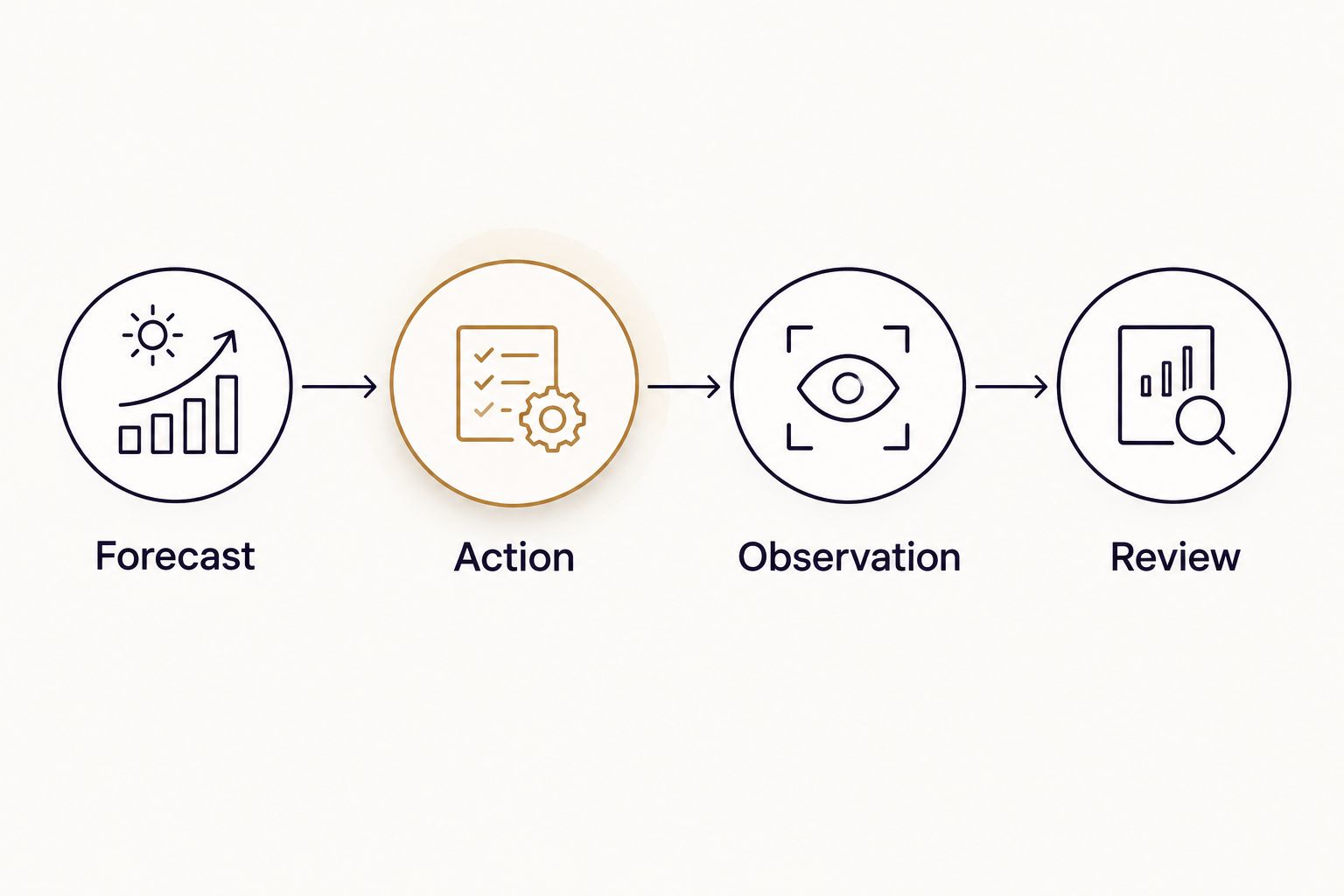
For example, an entry can say that you requested a career conversation, received a reply, and scheduled a meeting. That is an observation. Calling the reply proof of a forecast is a separate interpretation and belongs in a different section.
Include alternative explanations: preparation, another person's availability, an existing deadline, or chance. If the outcome contradicts the forecast, keep the contradiction. Do not rename an unsuccessful outcome to make it fit.
Second variant: track Personal Day reflections
Daily tracking is best for a defined journaling question, not constant reassurance. Try it for a limited period before extending it across your calendar.
- Create a separate database using the same properties and name it Daily reflections.
- Rebuild the Forecast review template there so daily entries cannot crowd out the monthly log.
- Give each entry its actual journal date. Record the Personal Day under Cycle Number and identify the method in Calculation method.
- Review the day's actions and observations before adding any interpretation.
Under the same single-digit convention, add the calendar day to the Personal Month and reduce. If the Personal Month is 5 and the calendar day is 12, the sum is 17, which reduces to Personal Day 8.
Do not copy the monthly theme into every daily entry and count each resemblance as a separate confirmation. For 2026 daily tracking, keep the question narrow: what did you choose, what happened, and what did you learn?
Troubleshooting
Your table cannot filter entries
You created a basic table instead of a database. Create a database using Table view, then transfer the entries. A basic table does not provide database properties, views, or entry templates.
Your cycle numbers disagree with your reading
Check the cycle boundary and master-number rule before changing the arithmetic. Also confirm you entered the Personal Year rather than the Life Path number; those numbers answer different questions within numerology.
New entries contain an old date
A date was saved in the template. Open the template, clear Date, and create a fresh test entry. Existing entries keep their own values and need separate correction.
A completed entry disappeared
Check the original database view. The Needs review filter hides entries after Reviewed is checked; it does not delete them. Remove the filter temporarily if you need to inspect the full log.
Your journal seems to confirm everything
Your wording is too broad to assess, or you are recording only memorable matches. Restore the original forecast, add specific observations, and complete Mismatch notes even when the field contains an uncomfortable contradiction.
Customize your workflow
Add detail only when it answers a recurring question. A career-focused tracker can record a decision deadline inside each entry; a relationship-focused tracker can record the conversation you intend to have. Neither needs a separate database for every life area.
Jahben offers personal numerology interpretation, while Notion holds your records. The benefit of a personal reading is context; the limitation is that interpretation still does not establish a guaranteed outcome. Keep your own observations separate from any advisor's wording.
Keep sensitive relationship details private, especially in a workspace controlled by an employer or shared with collaborators. Use initials where full names add no value.
For a deeper planning setup, follow the Personal Year to Google Calendar workflow. Keep the calendar for scheduled actions and the Notion entry for reflection rather than maintaining competing versions of the same forecast.
FAQ
What's the best numerology tracking Notion template for beginners?
A monthly database with dated forecasts, planned actions, observed outcomes, and mismatch notes is the best starting structure. Build the layout in this guide before adding daily tracking or formulas.
Does this guide include a downloadable Jahben Notion template?
No. This guide explains how to build your own Notion tracker; it does not provide a downloadable Jahben template or a connected reading service.
Can Notion calculate my Personal Year automatically?
Notion formulas can perform arithmetic, but this workflow uses manually checked numbers. Establish your cycle boundary and reduction rules before adding any formula.
Should I track my Life Path number or Personal Year number?
Use Personal Year for the annual-cycle workflow in this guide. Life Path is a separate birth-date calculation and should not replace the annual number in your forecast log.
Is monthly numerology tracking better than daily tracking?
Monthly tracking is better for beginners who want fewer entries and less upkeep. Daily tracking adds detail but also creates more opportunities to interpret ordinary events as meaningful matches.
Can this tracker prove that my numerology forecast is accurate?
No. A personal journal cannot establish predictive validity, especially when forecasts are broad and interpretations are subjective. Record mismatches and alternative explanations rather than treating every resemblance as proof.
Do I need to connect my email account to Notion?
No. Copy only the relevant forecast passage into the entry and record its source. This workflow does not require email permissions or an external integration.
One last thing
Your most useful entry is the one that does not fit. A mismatch reveals where the forecast was unclear, where your interpretation stretched, or where circumstances changed.
Before your next 2026 review, leave Original forecast untouched and complete Mismatch notes first. That simple order keeps the journal grounded in what happened—not just what you hoped to see.
Related guides
- How to calculate your Personal Month number for planning
- How to get an accurate numerology reading online
Ready for your own reading?
Astrology, numerology, and tarot brought together into one clear, written answer about your love, career, or timing.
Book a Personal Reading Get Your Free Report