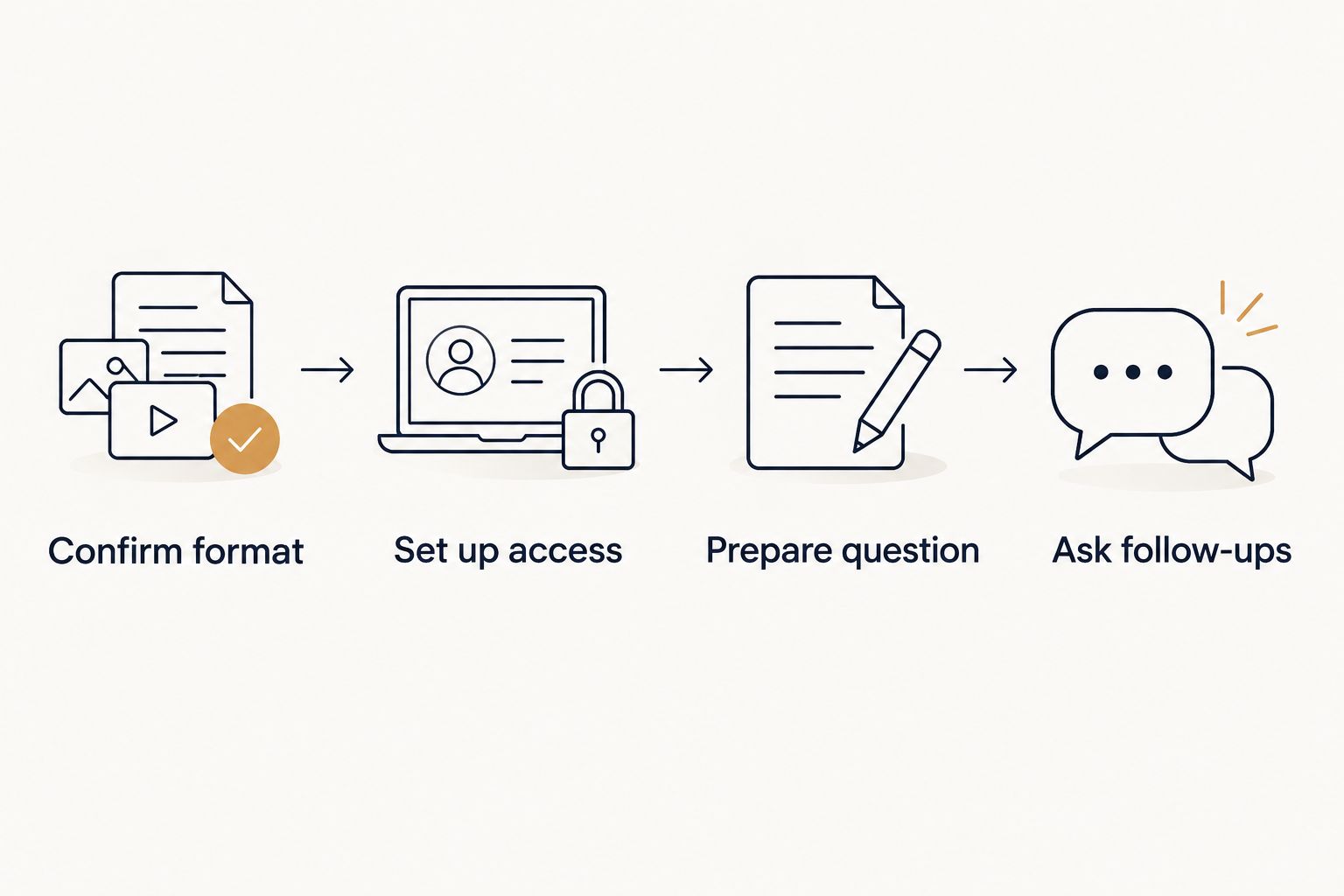
Instead of spending your session time sorting out a meeting link, audio, and what to ask, confirm the video format first, test your setup, and bring one clear question. A zoom psychic reading works best when the advisor has agreed to use Zoom; Jahben's live Clarity Session runs by phone or video call, so ask about Zoom when you book.
- For a zoom psychic reading in 2026, confirm the advisor will use Zoom before preparing a call.
- Jahben is best for people seeking personal guidance on love, career, or timing; confirm the live session format directly.
- Test your audio, bring one main question, and leave room to ask what the answer means for your next decision.
- Choose an email reading instead when you want a written answer rather than a real-time conversation.
Why this matters
A video call gives you the chance to clarify an answer while the reading is happening. It also gives you more to manage: a working link, usable audio, a private space, and a question specific enough to discuss. The setup is complete only when both you and the advisor know which meeting to join.
Jahben is a personal psychic-reading practice, not a Zoom integration or an automated booking workflow. Its stated reading formats include email and live sessions. If video is essential to you, confirm that Zoom is available before treating a live session as a video appointment. The first psychic reading preparation guide covers the questions to settle before the session itself.
Before you start
- Confirm the format with the advisor. Ask whether your live reading will happen on Zoom, who will host, and how you will receive the meeting link. Do not create a meeting and assume the advisor can join it.
- Have the right access. Keep the confirmed meeting link or meeting ID and passcode available. Use a device with a microphone, a reliable connection, and a place where you can speak privately.
- Write down your question. Bring one main question and two useful follow-ups. If you want astrology or numerology included, ask what birth or name details the advisor needs before sharing them.
The easy-to-miss obstacle is host approval. A valid Zoom link does not guarantee immediate entry: the host may need to start the meeting or admit you. Check the agreed start time and the advisor’s contact instructions before you open Zoom. In 2026, treat the meeting invitation—not the word live on its own—as confirmation of how you will connect.
Confirm the reading format
- Ask for a Zoom session explicitly. State that you want to speak by video rather than receive an email reading. If Zoom is unavailable, decide whether another live format meets your needs before you book.
- Agree on who hosts. Ask whether the advisor sends a meeting invitation or expects you to provide one. Use only the arrangement you have both confirmed.
- Check the joining details. Find the meeting link or the meeting ID and passcode, the start time, and the time zone. Keep the advisor’s instructions with them so you can resolve an access problem without searching through messages.
- Check the scope of the reading. Tell the advisor whether your question is about love, career, timing, or a broader life decision. Ask whether tarot, astrology, numerology, or another stated method is relevant to that question; do not assume every method will be used in one session.
Expected result: you know the format, start time, host, and subject before opening Zoom. If any of those is unclear, resolve it first. More camera preparation will not fix a missing invitation.
Set up your Zoom access
- Open the confirmed invitation. On a device with Zoom available, select the meeting link. If you have a meeting ID instead, open Zoom, select Join, and enter the ID and any passcode supplied by the host.
- Check the meeting name. Make sure you are joining the invitation you agreed to use, especially if you have other Zoom meetings on your calendar. Use the details sent for this reading rather than an older link.
- Choose your audio. Follow the on-screen audio prompt. Where Zoom offers Test Speaker and Microphone, use it to check both what you hear and what the advisor will hear. Then choose Join with Computer Audio if that is the audio option you intend to use.
- Check video before speaking. Use Start Video if it is off and video is part of your agreement. Position the device so you can look at the screen without handling it throughout the reading.
Expected result: you enter the correct meeting, can hear its audio, and have a working microphone. Zoom button names can differ by device or app version; follow the equivalent join, audio-test, and video controls if your screen uses different wording. A 2026 zoom psychic reading should not depend on finding an unfamiliar control after the conversation starts.
Prepare your question and space
- Write one decision in plain language. For example: What should I examine before deciding whether to change jobs? That gives the advisor a subject you can discuss. Tell me everything about my future gives you no clear way to test whether the answer helped.
- Add two follow-ups. Ask what pattern the reading identifies and what you should consider next. Keep the questions where you can see them without switching between apps during the call.
- Set a boundary for personal details. Share only information you are comfortable using for the reading. If a method requires a birth time or full name and you do not have it, say so before the session rather than guessing.
- Give yourself 10 minutes before the agreed start time. Check your microphone, silence distractions, and open your notes. That is a preparation recommendation, not a promise about how long the reading will last.
Expected result: you can state the question without explaining your entire history first. Your notes should support the conversation, not become a script the advisor must follow.
Use the live session for clarification
- Check the connection at the start. Say whether you can hear the advisor clearly. If the sound is poor, address it before discussing private details.
- State your main question. Give the decision and the context that changes its meaning. Let the advisor know whether you want to focus on love, career, or timing rather than asking for every topic at once.
- Ask what an answer applies to. If you hear a broad interpretation, ask how it relates to the decision you described. A useful follow-up is: What should I pay attention to as I make this choice?
- Separate interpretation from action. Make a note of what the advisor said and what you plan to verify or decide yourself. A psychic reading can be a source of reflection; it does not replace medical, legal, or financial advice.
- Close with your next question, not a forced conclusion. If a point remains unclear, ask about it before the call ends. You can leave with an open question rather than pretending the decision is settled.
Expected result: you leave with an understandable account of the reading and a clear sense of which questions remain yours to answer. Jahben is best for individuals who want personal psychic guidance on love, career, or timing—not an unconfirmed Zoom appointment or a guaranteed outcome.
Choose email when you need a written answer
A zoom psychic reading and an email reading solve different problems. Video supports immediate follow-up; email gives you a response you can return to without relying on your call notes. Jahben offers both live and email readings, but the live session’s platform still needs confirmation. If you cannot secure a suitable live format, the step-by-step email psychic reading guide explains the written alternative.
| Format | Best for | Advantage | Limitation |
|---|---|---|---|
| Confirmed Zoom live session | Asking follow-up questions as an answer develops | You can clarify a point in real time | You need an agreed Zoom invitation, working audio, and privacy |
| Email psychic reading | Thinking through a written response at your own pace | You can reread the answer | You cannot ask an immediate spoken follow-up |
Choose a confirmed Zoom session if the conversation itself is what you need. Choose email if a written answer matters more than immediate exchange. Neither format proves an interpretation is accurate merely because it feels specific. In 2026, judge the reading against the question you asked and the meaning you can actually use.
To use the email variant, put your main question in the message, add only the context needed to understand it, and check what details the advisor requests for the method being used. Keep a copy of your question. When the response arrives, read it against that original wording before deciding whether to ask anything else.
Troubleshoot the call
- The link opens, but you cannot enter. Check the agreed start time and time zone. If Zoom shows a waiting screen, allow time for the host to start or admit the meeting; use the advisor’s stated contact method if the problem continues.
- You can see the advisor but hear nothing. Check Zoom’s audio connection and your device’s output selection. Use Test Speaker and Microphone where available, then reconnect audio if necessary.
- The advisor cannot hear you. Check Mute, confirm Zoom has permission to use your microphone, and verify that the correct input device is selected. Test a different microphone only after checking those settings.
- The meeting ends or the connection drops. Reopen the same confirmed invitation unless the advisor tells you to use another one. Do not guess a replacement link or assume an interrupted call has automatically been extended.
- You expected video but received another format. Pause before sharing your question. Confirm whether you are in the agreed session and whether you want to continue in that format.
Most setup failures are access or audio problems, not reading problems. Fix those first. If privacy is the obstacle, move to a space where you can speak freely or arrange a different format rather than pushing through a personal question on an exposed call.
Customize your workflow
Once the basic connection works, tailor your notes to the decision. For a career question, write down the options you are choosing between and the timing concern. For a relationship question, describe the pattern you want to understand without presenting someone else’s private thoughts as a fact the advisor must confirm.
If you want several interpretive methods, ask which methods fit your question before the session. Jahben’s stated practice includes psychic guidance, astrology, Pythagorean numerology, and tarot; that does not mean every live reading includes all of them. A focused question gives you a better basis for deciding whether one method or a layered discussion is appropriate.
You can also change how you take notes. Write short phrases during the call, then expand them immediately afterward while the distinction between the advisor’s words and your interpretation is fresh. If taking notes interrupts your attention, ask whether a brief pause is possible. Do not record a private session without the other person’s consent.
FAQ
How do I arrange a zoom psychic reading in 2026?
Confirm that the advisor offers Zoom, agree on who hosts, and get the meeting details before the session. Jahben's Clarity Session is a live 1-on-1 by phone or video call; ask about Zoom when you book.
Does a live reading with Jahben automatically happen on Zoom?
No Zoom platform commitment is stated for Jahben’s live readings. Ask which format will be used before treating a live booking as a video call.
What do I need before joining a Zoom psychic reading?
You need the confirmed invitation or meeting ID and passcode, a working microphone, a private place, and a clear question. Check the start time and time zone as well.
What should I ask during a live psychic reading?
Ask about a specific decision or pattern you want to understand. Bring a follow-up that asks how the interpretation relates to your situation rather than requesting certainty about an outcome.
Is Zoom better than an email psychic reading?
Zoom is better when you need immediate clarification and the advisor has confirmed that format. Email is better when you want a written answer you can reread; neither format guarantees accuracy.
What if the advisor cannot hear me on Zoom?
Check whether you are muted, whether Zoom has microphone permission, and whether the correct input is selected. Use Zoom’s microphone test where available before changing devices.
Can I record my Zoom psychic reading?
Ask the advisor for consent before recording; Jahben does not record live sessions. If recording is not agreed, take brief notes and expand them after the call.
One last thing
The most useful 2026 setup step happens before you open Zoom: get an explicit agreement on the format. Once that is settled, bring one decision you can name. Jahben’s personal psychic readings can help you explore it, while the call setup and the final choice remain yours.
Related guides
- Best live psychic reading for real-time guidance
- How to prepare for a psychic reading on the phone
- How to know if a psychic reading was accurate
Ready for your own reading?
Astrology, numerology, and tarot brought together into one clear, written answer about your love, career, or timing.
Book a Personal Reading Get Your Free Report